
Local State vs Global State: Decision Framework for React Apps
Welcome back to our React deep dive series! You've mastered component basics, props vs state, controlled inputs, keys in lists, reusable systems, parent-child communication, useState pitfalls, useEffect mastery, useRef power, and building your first custom hook for form handling. Now discover when to keep state local versus lifting it global in order management apps.
The State Spectrum in Order Management
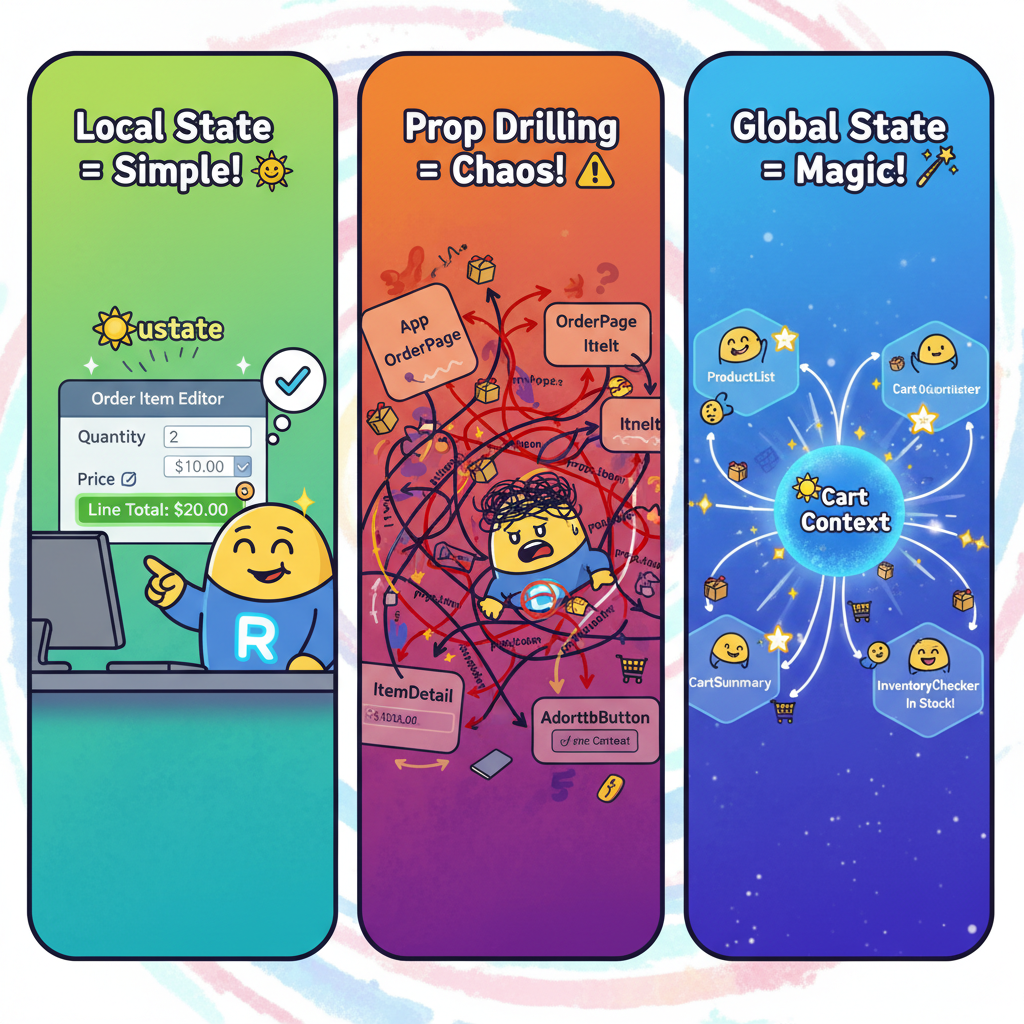
State management decisions shape scalable React apps, especially in enterprise order systems handling carts, inventory, and workflows. Local state stays within one component for isolated concerns like a single order form field. Global state spans multiple components for shared data like user sessions or order history across dashboards.
Consider an order management dashboard: a ProductList shows items, OrderCart tallies totals, and InventoryAlert warns on stock levels. Local state suffices for individual item quantities, but cart totals need global visibility. Wrong choices lead to prop drilling hell or bloated components.
Local State: Keep It Close, Keep It Simple
Local state shines for component-specific data that doesn't cross boundaries. In order apps, use it for transient UI states like form inputs or toggleable panels. React's useState handles this efficiently without overhead.
Complete Runnable Example: Local State Order Item Editor
Create a new React app and replace these files to test locally:
App.js
import React from 'react';
import OrderItemEditor from './OrderItemEditor';
import './App.css';

function App() {
  return (
    <div className="App">
      <h1>Local State: Single Order Item Editor</h1>
      <OrderItemEditor />
    </div>
  );
}

export default App;
OrderItemEditor.js
import React, { useState } from 'react';

const OrderItemEditor = () => {
  const [item, setItem] = useState({
    name: 'Wireless Keyboard',
    quantity: 1,
    price: 49.99,
    discount: 0
  });

  const updateQuantity = (e) => {
    const newQty = Math.max(0, parseInt(e.target.value) || 0);
    setItem(prev => ({ ...prev, quantity: newQty }));
  };

  const applyDiscount = () => {
    setItem(prev => ({
      ...prev,
      discount: prev.discount < 20 ? prev.discount + 5 : 0
    }));
  };

  const lineTotal = (item.quantity * item.price * (1 - item.discount / 100)).toFixed(2);

  return (
    <div style={{
      maxWidth: '400px',
      padding: '20px',
      border: '2px solid #4CAF50',
      borderRadius: '8px',
      fontFamily: 'Arial, sans-serif'
    }}>
      <h3>Edit Order Item</h3>
      <div>
        <label>Product: {item.name}</label>
      </div>
      <div>
        <label>Qty: </label>
        <input
          type="number"
          value={item.quantity}
          onChange={updateQuantity}
          style={{ marginLeft: '10px', padding: '5px' }}
        />
      </div>
      <div>
        <label>Price: ${item.price}</label>
      </div>
      <div>
        <label>Discount: {item.discount}%</label>
        <button onClick={applyDiscount} style={{
          marginLeft: '10px', padding: '5px 10px', background: '#2196F3', color: 'white', border: 'none', borderRadius: '4px'
        }}>
          Toggle 5% Discount
        </button>
      </div>
      <div style={{ fontSize: '1.2em', fontWeight: 'bold', marginTop: '15px', color: '#4CAF50' }}>
        Line Total: ${lineTotal}
      </div>
    </div>
  );
};

export default OrderItemEditor;
Run npx create-react-app local-state-demo, replace files, then npm start. Change quantity or toggle discount—total updates instantly. This stays local because one component owns the item data.
Local state excels here: no parent needs the line total, changes don't ripple elsewhere. Adding useRef for input focus would enhance it, as covered in our useRef article.
Signs You Need Global State
Global state emerges when data flows across component trees. In order management, shared states include: active user cart, order history list, real-time inventory levels, or fulfillment status across dashboard views.
Key Indicators:
- Multiple unrelated components read/write the same data
- Prop drilling through 3+ levels
- Data persists across route changes (e.g., cart survives navigation)
- Real-time sync needed (e.g., inventory updates from warehouse component)
Without global state, you'd pass cart data from App → Dashboard → Sidebar → CartWidget, creating fragile chains. Our previous parent-child communication article showed lifting fixes shallow trees, but deep ones demand global solutions.
Global State Example: Order Cart Across Components
Imagine a dashboard where ProductList updates CartSummary and InventoryChecker simultaneously. Local state per component duplicates logic; global state centralizes it.
Complete Runnable Example: Global Cart with Context (Pre-Context API Teaser)
For this demo, we'll use a simple Context-like pattern (full Context next article). Create app:
App.js
import React, { createContext, useContext, useState, useCallback } from 'react';
import ProductList from './ProductList';
import CartSummary from './CartSummary';
import InventoryChecker from './InventoryChecker';
import './App.css';

// Create Context
const CartContext = createContext();

// Export the hook for other components
export const useCart = () => {
  const context = useContext(CartContext);
  if (!context) {
    throw new Error('useCart must be used within CartProvider');
  }
  return context;
};

// Cart Provider Component
export const CartProvider = ({ children }) => {
  const [cart, setCart] = useState([]);

  const addToCart = useCallback((product) => {
    setCart(prev => {
      const existing = prev.find(item => item.id === product.id);
      if (existing) {
        return prev.map(item =>
          item.id === product.id
            ? { ...item, quantity: item.quantity + 1 }
            : item
        );
      }
      return [...prev, { ...product, quantity: 1 }];
    });
  }, []);

  const removeFromCart = useCallback((id) => {
    setCart(prev => prev.filter(item => item.id !== id));
  }, []);

  const updateQuantity = useCallback((id, quantity) => {
    if (quantity <= 0) return removeFromCart(id);
    setCart(prev =>
      prev.map(item =>
        item.id === id ? { ...item, quantity } : item
      )
    );
  }, [removeFromCart]);

  const totalItems = cart.reduce((sum, item) => sum + item.quantity, 0);
  const totalPrice = cart.reduce((sum, item) => sum + (item.price * item.quantity), 0);

  return (
    <CartContext.Provider value={{
      cart,
      addToCart,
      removeFromCart,
      updateQuantity,
      totalItems,
      totalPrice
    }}>
      {children}
    </CartContext.Provider>
  );
};

function App() {
  return (
    <div className="App">
      <CartProvider>
        <h1>🚀 Global State: Order Management Dashboard</h1>
        <p style={{ color: '#666', fontSize: '1.1em' }}>
          Add items → Watch Cart & Inventory update instantly!
        </p>
        <div style={{
          display: 'flex',
          gap: '20px',
          flexWrap: 'wrap',
          justifyContent: 'center',
          maxWidth: '1200px',
          margin: '0 auto'
        }}>
          <ProductList />
          <CartSummary />
          <InventoryChecker />
        </div>
      </CartProvider>
    </div>
  );
}

export default App;
ProductList.js
import React from 'react';
import { useCart } from './App';

const products = [
  { id: 1, name: 'Laptop Stand', price: 29.99, stock: 15 },
  { id: 2, name: 'USB-C Hub', price: 19.99, stock: 8 },
  { id: 3, name: 'Monitor Arm', price: 59.99, stock: 3 }
];

const ProductList = () => {
  const { addToCart, cart } = useCart();

  const canAddToCart = (productId) => {
    const cartItem = cart.find(item => item.id === productId);
    const product = products.find(p => p.id === productId);

    if (!product) return false;

    const currentCartQty = cartItem ? cartItem.quantity : 0;
    return (currentCartQty + 1) <= product.stock;
  };

  const getStockStatus = (productId) => {
    const cartItem = cart.find(item => item.id === productId);
    const product = products.find(p => p.id === productId);

    if (!product) return 'unknown';

    const currentCartQty = cartItem ? cartItem.quantity : 0;
    const remaining = product.stock - currentCartQty;

    if (remaining === 0) return 'out-of-stock';
    if (remaining < 3) return 'low-stock';
    return 'in-stock';
  };

  return (
    <div style={{
      width: '300px',
      padding: '20px',
      background: 'white',
      borderRadius: '12px',
      boxShadow: '0 8px 24px rgba(0,0,0,0.15)',
      border: '1px solid #e0e0e0'
    }}>
      <h3 style={{ marginTop: 0, color: '#333' }}>📦 Products</h3>
      {products.map(product => {
        const status = getStockStatus(product.id);
        const isDisabled = status === 'out-of-stock';

        return (
          <div key={product.id} style={{
            display: 'flex',
            justifyContent: 'space-between',
            alignItems: 'center',
            padding: '12px',
            borderBottom: '1px solid #f0f0f0',
            background: status === 'low-stock' ? '#fff8e1' : 'white',
            transition: 'all 0.2s'
          }}>
            <div>
              <div style={{ fontWeight: 500 }}>{product.name}</div>
              <div style={{ color: '#666', fontSize: '0.9em' }}>${product.price}</div>
              <div style={{
                fontSize: '0.8em',
                color: status === 'out-of-stock' ? '#f44336' :
                       status === 'low-stock' ? '#FF9800' : '#4CAF50'
              }}>
                {status === 'out-of-stock' ? '❌ Sold Out' :
                 status === 'low-stock' ? `⚠️ ${products.find(p => p.id === product.id).stock - (cart.find(item => item.id === product.id)?.quantity || 0)} left` :
                 `✅ ${product.stock} in stock`}
              </div>
            </div>
            <button
              onClick={() => !isDisabled && addToCart(product)}
              disabled={isDisabled}
              style={{
                padding: '8px 16px',
                background: isDisabled ? '#f5f5f5' : 'linear-gradient(45deg, #4CAF50, #45a049)',
                color: isDisabled ? '#999' : 'white',
                border: 'none',
                borderRadius: '6px',
                cursor: isDisabled ? 'not-allowed' : 'pointer',
                fontWeight: 500,
                opacity: isDisabled ? 0.6 : 1,
                transition: 'all 0.2s'
              }}
              title={isDisabled ? 'Out of stock!' : 'Add to cart'}
            >
              {isDisabled ? 'Sold Out' : 'Add to Cart'}
            </button>
          </div>
        );
      })}
    </div>
  );
};

export default ProductList;
CartSummary.js
import React from 'react';
import { useCart } from './App';

const CartSummary = () => {
  const { cart, totalItems, totalPrice, removeFromCart } = useCart();

  // Add max quantity warning
  const hasStockIssues = cart.some(item => {
    const products = [
      { id: 1, stock: 15 },
      { id: 2, stock: 8 },
      { id: 3, stock: 3 }
    ];
    const product = products.find(p => p.id === item.id);
    return product && item.quantity > product.stock;
  });

  return (
    <div style={{
      width: '300px',
      padding: '20px',
      background: hasStockIssues ?
        'linear-gradient(135deg, #FF5722, #D84315)' :
        'linear-gradient(135deg, #2196F3, #1976D2)',
      color: 'white',
      borderRadius: '12px',
      boxShadow: '0 8px 24px rgba(33, 150, 243, 0.3)'
    }}>
      <h3 style={{ marginTop: 0 }}>🛒 Cart Summary</h3>
      <div style={{
        fontSize: '1.4em',
        fontWeight: 'bold',
        marginBottom: '20px',
        background: 'rgba(255,255,255,0.2)',
        padding: '12px',
        borderRadius: '8px'
      }}>
        {totalItems} items
        <br />
        <span style={{ fontSize: '1.2em' }}>${totalPrice.toFixed(2)}</span>
      </div>

      {cart.length ? (
        cart.map(item => {
          const products = [
            { id: 1, name: 'Laptop Stand', stock: 15 },
            { id: 2, name: 'USB-C Hub', stock: 8 },
            { id: 3, name: 'Monitor Arm', stock: 3 }
          ];
          const product = products.find(p => p.id === item.id);
          const isOverStocked = product && item.quantity > product.stock;

          return (
            <div key={item.id} style={{
              display: 'flex',
              justifyContent: 'space-between',
              alignItems: 'center',
              padding: '10px 0',
              borderBottom: '1px solid rgba(255,255,255,0.1)',
              background: isOverStocked ? 'rgba(255,87,34,0.2)' : 'transparent'
            }}>
              <div>
                <div style={{ fontWeight: 500 }}>
                  {item.name}
                  {isOverStocked && <span style={{ color: '#FFEBEE', fontSize: '0.8em' }}> ⚠️ OVERSTOCK</span>}
                </div>
                <div style={{ fontSize: '0.9em', opacity: 0.9 }}>
                  ${item.price.toFixed(2)} x {item.quantity}
                  {product && ` (Max: ${product.stock})`}
                </div>
              </div>
              <button
                onClick={() => removeFromCart(item.id)}
                style={{
                  background: 'rgba(255,255,255,0.2)',
                  border: 'none',
                  color: 'white',
                  padding: '4px 12px',
                  borderRadius: '4px',
                  cursor: 'pointer',
                  fontSize: '0.85em'
                }}
              >
                Remove
              </button>
            </div>
          );
        })
      ) : (
        <div style={{
          color: 'rgba(255,255,255,0.7)',
          fontStyle: 'italic',
          textAlign: 'center',
          padding: '20px'
        }}>
          Your cart is empty 😊
        </div>
      )}
    </div>
  );
};

export default CartSummary;
InventoryChecker.js
import React from 'react';
import { useCart } from './App';

const InventoryChecker = () => {
  const { cart } = useCart();

  const products = [
    { id: 1, name: 'Laptop Stand', stock: 15 },
    { id: 2, name: 'USB-C Hub', stock: 8 },
    { id: 3, name: 'Monitor Arm', stock: 3 }
  ];

  const allProductsStatus = products.map(product => {
    const cartItem = cart.find(item => item.id === product.id);
    const cartQty = cartItem ? cartItem.quantity : 0;
    const remaining = product.stock - cartQty;

    return {
      ...product,
      cartQty,
      remaining,
      status: remaining <= 0 ? 'out-of-stock' : remaining < 3 ? 'low-stock' : 'in-stock'
    };
  });

  const lowStockItems = allProductsStatus.filter(item =>
    item.status === 'low-stock' || item.status === 'out-of-stock'
  );

  return (
    <div style={{
      width: '300px',
      padding: '20px',
      background: lowStockItems.length ?
        'linear-gradient(135deg, #FF5722, #D84315)' :
        'linear-gradient(135deg, #4CAF50, #45a049)',
      color: 'white',
      borderRadius: '12px',
      boxShadow: '0 8px 24px rgba(255, 152, 0, 0.3)'
    }}>
      <h3 style={{ marginTop: 0 }}>⚠️ Inventory Status</h3>

      {lowStockItems.length ? (
        lowStockItems.map(item => (
          <div key={item.id} style={{
            padding: '12px',
            background: 'rgba(255,255,255,0.15)',
            borderRadius: '8px',
            marginBottom: '10px',
            borderLeft: `4px solid ${item.status === 'out-of-stock' ? '#FFEBEE' : '#FFF3E0'}`
          }}>
            <div style={{ fontWeight: 600, fontSize: '1.1em' }}>
              {item.status === 'out-of-stock' ? '🚫' : '⚠️'} {item.name}
            </div>
            <div style={{ fontSize: '0.9em', opacity: 0.9 }}>
              Cart: {item.cartQty} | Stock: {item.stock} |
              Remaining: <strong>{item.remaining}</strong>
            </div>
          </div>
        ))
      ) : (
        <div style={{
          color: 'rgba(255,255,255,0.9)',
          fontSize: '1.2em',
          textAlign: 'center',
          padding: '30px 20px'
        }}>
          ✅ All products well stocked
          <br />
          <small style={{ opacity: 0.8 }}>No inventory issues</small>
        </div>
      )}

      {cart.length > 0 && (
        <div style={{
          marginTop: '15px',
          padding: '10px',
          background: 'rgba(255,255,255,0.1)',
          borderRadius: '6px',
          fontSize: '0.85em'
        }}>
          Total SKUs monitored: {products.length}
        </div>
      )}
    </div>
  );
};

export default InventoryChecker;
App.css (same gradient background as before)
.App {
  text-align: center;
  padding: 50px;
  background: linear-gradient(135deg, #667eea 0%, #764ba2 100%);
  min-height: 100vh;
  font-family: Arial, sans-serif;
}
Run it: Add items to cart—watch Summary and Inventory update in real-time without props! ProductList writes to global cart; distant siblings read it seamlessly.
This beats local state: CartSummary doesn't receive props; changes propagate automatically. In real OMS, this pattern scales to 20+ components sharing order data.
Decision Matrix: Local vs Global
| Scenario | Local State | Global State | Order Mgmt Example |
|---|---|---|---|
| Single component owns data | ✅ Perfect | ❌ Overhead | Individual order line editor |
| 2-3 related components | ✅ Lift to parent | ⚠️ Consider | Form + preview pane |
| 4+ unrelated components | ❌ Prop drilling | ✅ Essential | Cart across dashboard, checkout, sidebar |
| Persists across routes | ❌ Lost on unmount | ✅ Required | User shopping cart |
| Real-time sync needed | ❌ Manual sync | ✅ Automatic | Inventory across warehouse UI |
| Frequent deep updates | ❌ Performance hit | ✅ Optimized | Order status broadcast |
Use this table for decisions. Threshold: if data crosses 3+ components or routes, go global.
Real-World OMS Migration Path
- Start Local: Single order form → useState galore
- Lift Parent: Form + Summary → parent state
- Go Global: Dashboard-wide → Context/Store
- Scale: Add persistence (localStorage), sync (API)
Our cart demo maps step 3. In Sterling OMS integrations, global state mirrors backend order aggregates.
When Global Goes Wrong (Anti-Patterns)
- Premature Global: Single form → Context? No, adds complexity.
- God Object: One store holds everything (forms, UI toggles, orders).
- No Granularity: Massive state objects → useSelector hell.
Fix: Small, focused stores (CartStore, UserStore, OrdersStore).
Tooling & Ecosystem Tease
Before full global solutions, debug with React DevTools Profiler. Track re-renders to validate decisions.
Production OMS? Combine with our custom useForm hook for local forms feeding global carts.
Next Steps: Hands-On Practice
- Fork local demo, add "wishlist" local state per product
- Extend global demo: persist cart to localStorage
- Time 100 rapid quantity changes—compare local vs global smoothness
- Build mini-OMS: orders list with per-order local editors + global totals
Master these, and your React OMS apps scale effortlessly.
In our next article, dive into Context API for shared state and patterns—the gateway to professional global state without Redux boilerplate. See you there!
Member discussion