
SWR & React Query for fast, cached data fetching
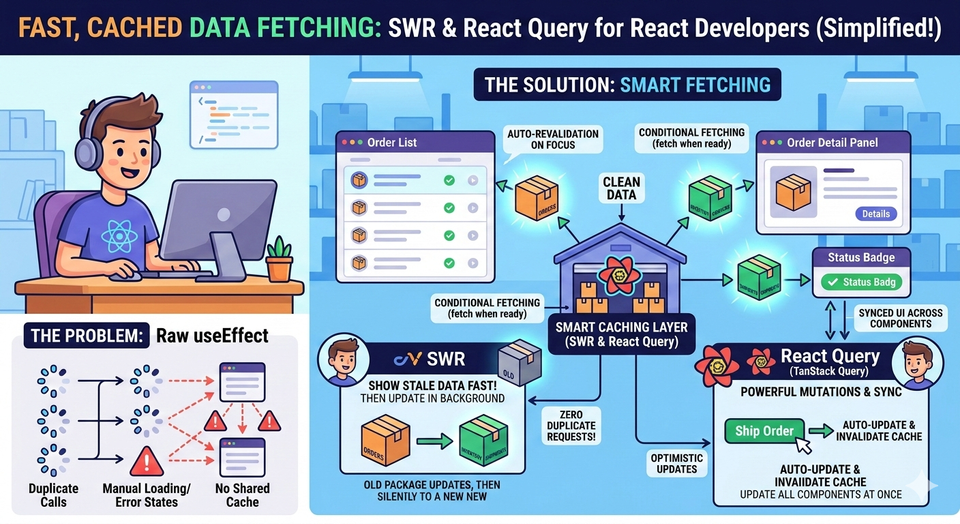
So far in this series, we've tackled useEffect for data fetching, global state with Redux Toolkit, and even server vs client state management. If you've been following along, you already know that fetching data in React can get complicated fast — especially when you're dealing with order lists, inventory counts, shipment statuses, and customer records that change in near real-time.
That's exactly the problem that SWR and React Query (now called TanStack Query) were built to solve.
In this article, we'll explore both libraries through the lens of an Order Management System (OMS), see how they make your data fetching cleaner and smarter, and build examples you can run locally right now.
The Problem with Plain useEffect for Data Fetching
Before we jump in, let's quickly acknowledge the limitations we're solving. When you use raw useEffect for fetching, you have to manually manage:
- Loading states
- Error states
- Re-fetching when data goes stale
- Caching to avoid duplicate requests
- Keeping UI in sync across multiple components using the same data
For a simple todo app, that's manageable. But in an OMS, you might have a Orders List, an Order Detail Panel, and an Order Badge in the Header — all showing data from the same /orders endpoint. Without a smart caching layer, you'd be firing three separate API calls for the same data, and they'd each maintain their own loading/error states.
SWR and React Query solve all of this out of the box.
What Is SWR?
SWR stands for Stale-While-Revalidate — a caching strategy from HTTP where you return cached (stale) data immediately, then revalidate in the background to update it.
The core idea: show something fast, then silently update it.
Installing SWR
npm install swrYour First SWR Hook
import useSWR from 'swr';

const fetcher = (url) => fetch(url).then((res) => res.json());

function OrderList() {
  const { data, error, isLoading } = useSWR('/api/orders', fetcher);

  if (isLoading) return <p>Loading orders...</p>;
  if (error) return <p>Failed to load orders.</p>;

  return (
    <ul>
      {data.map((order) => (
        <li key={order.id}>#{order.id} — {order.status}</li>
      ))}
    </ul>
  );
}
That's it. SWR gives you data, error, and isLoading — no useEffect, no useState, no cleanup functions.
Building a Real OMS Example with SWR
Let's build something you can actually run. We'll simulate an order management dashboard that fetches orders and shows their status — using a mock API via json-server or just a local db.json.
Project Setup
npx create-react-app oms-swr-demo
cd oms-swr-demo
npm install swr
npm install -g json-server
Create a mock database file at the root of your project:
📄 db.json (project root)
{
  "orders": [
    { "id": 1001, "customer": "Alice Martin", "status": "Processing", "total": 249.99 },
    { "id": 1002, "customer": "Bob Singh", "status": "Shipped", "total": 89.00 },
    { "id": 1003, "customer": "Carol Wu", "status": "Delivered", "total": 512.50 },
    { "id": 1004, "customer": "David Lee", "status": "Processing", "total": 74.20 },
    { "id": 1005, "customer": "Eva Patel", "status": "Cancelled", "total": 199.99 }
  ]
}
Start your mock server in a separate terminal:
json-server --watch db.json --port 3001Now let's build our components.
📄 src/fetcher.js
// A global fetcher function used by SWR
const fetcher = (url) => fetch(url).then((res) => {
  if (!res.ok) throw new Error('Network response was not ok');
  return res.json();
});

export default fetcher;
📄 src/components/OrderList.js
import useSWR from 'swr';
import fetcher from '../fetcher';

const statusColors = {
  Processing: '#f59e0b',
  Shipped: '#3b82f6',
  Delivered: '#10b981',
  Cancelled: '#ef4444',
};

function OrderList({ onSelectOrder }) {
  const { data: orders, error, isLoading } = useSWR(
    'http://localhost:3001/orders',
    fetcher
  );

  if (isLoading) return <p style={{ padding: '1rem' }}>⏳ Loading orders...</p>;
  if (error) return <p style={{ color: 'red', padding: '1rem' }}>❌ Failed to load orders.</p>;

  return (
    <div style={{ padding: '1rem' }}>
      <h2>📦 All Orders</h2>
      <table style={{ width: '100%', borderCollapse: 'collapse' }}>
        <thead>
          <tr style={{ background: '#f3f4f6' }}>
            <th style={th}>Order ID</th>
            <th style={th}>Customer</th>
            <th style={th}>Status</th>
            <th style={th}>Total</th>
            <th style={th}>Action</th>
          </tr>
        </thead>
        <tbody>
          {orders.map((order) => (
            <tr key={order.id}>
              <td style={td}>#{order.id}</td>
              <td style={td}>{order.customer}</td>
              <td style={td}>
                <span style={{
                  background: statusColors[order.status] || '#ccc',
                  color: 'white',
                  padding: '2px 8px',
                  borderRadius: '12px',
                  fontSize: '0.8rem'
                }}>
                  {order.status}
                </span>
              </td>
              <td style={td}>${order.total.toFixed(2)}</td>
              <td style={td}>
                <button onClick={() => onSelectOrder(order.id)}>View</button>
              </td>
            </tr>
          ))}
        </tbody>
      </table>
    </div>
  );
}

const th = { textAlign: 'left', padding: '8px', borderBottom: '1px solid #e5e7eb' };
const td = { padding: '8px', borderBottom: '1px solid #f3f4f6' };

export default OrderList;
📄 src/components/OrderDetail.js
import useSWR from 'swr';
import fetcher from '../fetcher';

function OrderDetail({ orderId }) {
  const { data: order, error, isLoading } = useSWR(
    orderId ? `http://localhost:3001/orders/${orderId}` : null,
    fetcher
  );

  if (!orderId) return <p style={{ padding: '1rem', color: '#888' }}>Select an order to view details.</p>;
  if (isLoading) return <p style={{ padding: '1rem' }}>⏳ Loading order #{orderId}...</p>;
  if (error) return <p style={{ color: 'red', padding: '1rem' }}>❌ Order not found.</p>;

  return (
    <div style={{ padding: '1rem', border: '1px solid #e5e7eb', borderRadius: '8px', margin: '1rem' }}>
      <h2>🔍 Order Detail — #{order.id}</h2>
      <p><strong>Customer:</strong> {order.customer}</p>
      <p><strong>Status:</strong> {order.status}</p>
      <p><strong>Total:</strong> ${order.total.toFixed(2)}</p>
    </div>
  );
}

export default OrderDetail;
📄 src/App.js
import { useState } from 'react';
import OrderList from './components/OrderList';
import OrderDetail from './components/OrderDetail';

function App() {
  const [selectedOrderId, setSelectedOrderId] = useState(null);

  return (
    <div style={{ fontFamily: 'sans-serif', maxWidth: '900px', margin: '0 auto' }}>
      <h1 style={{ padding: '1rem', background: '#1e3a5f', color: 'white', margin: 0 }}>
        🛒 OMS Dashboard — SWR Demo
      </h1>
      <OrderList onSelectOrder={setSelectedOrderId} />
      <OrderDetail orderId={selectedOrderId} />
    </div>
  );
}

export default App;
Run the app with npm start (and keep json-server running in a separate terminal). You'll see a live order list. Click "View" on any row and the detail panel updates instantly — with caching. If you click the same order again, SWR returns the cached response immediately without a new network call.
Key SWR Features for OMS Use Cases
Auto-Revalidation on Focus
When a warehouse worker switches tabs and comes back, you want the order list to refresh silently. SWR does this automatically — it revalidates stale data when the window regains focus.
const { data } = useSWR('http://localhost:3001/orders', fetcher, {
  revalidateOnFocus: true,       // default: true
  refreshInterval: 30000,        // auto-refresh every 30 seconds
});
This is incredibly useful for order management where statuses change without the user doing anything — a shipment goes out, an order gets cancelled — and your UI should reflect that without requiring a page reload.
Conditional Fetching
Pass null as the key to prevent fetching until you're ready. We used this in OrderDetail — no request goes out until an order is selected.
const { data } = useSWR(orderId ? `/orders/${orderId}` : null, fetcher);What Is React Query (TanStack Query)?
React Query (now officially called TanStack Query) is a more feature-rich alternative. It's opinionated about server state management and gives you more tools for mutations, pagination, optimistic updates, and background sync.
Think of it this way: if SWR is a sharp kitchen knife, React Query is a full chef's toolkit.
Installing React Query
npm install @tanstack/react-queryBuilding the Same OMS Dashboard with React Query
We'll use the same db.json and json-server setup as before.
📄 src/queryClient.js
import { QueryClient } from '@tanstack/react-query';

const queryClient = new QueryClient({
  defaultOptions: {
    queries: {
      staleTime: 1000 * 60,     // data is fresh for 1 minute
      cacheTime: 1000 * 60 * 5, // cache held for 5 minutes
      retry: 2,                  // retry failed requests twice
    },
  },
});

export default queryClient;
📄 src/hooks/useOrders.js
import { useQuery } from '@tanstack/react-query';

const fetchOrders = async () => {
  const res = await fetch('http://localhost:3001/orders');
  if (!res.ok) throw new Error('Failed to fetch orders');
  return res.json();
};

export function useOrders() {
  return useQuery({
    queryKey: ['orders'],
    queryFn: fetchOrders,
  });
}
📄 src/hooks/useOrder.js
import { useQuery } from '@tanstack/react-query';

const fetchOrder = async (id) => {
  const res = await fetch(`http://localhost:3001/orders/${id}`);
  if (!res.ok) throw new Error('Order not found');
  return res.json();
};

export function useOrder(orderId) {
  return useQuery({
    queryKey: ['orders', orderId],
    queryFn: () => fetchOrder(orderId),
    enabled: !!orderId, // only run if orderId is truthy
  });
}
📄 src/components/OrderListRQ.js
import { useOrders } from '../hooks/useOrders';

const statusColors = {
  Processing: '#f59e0b',
  Shipped: '#3b82f6',
  Delivered: '#10b981',
  Cancelled: '#ef4444',
};

function OrderListRQ({ onSelectOrder }) {
  const { data: orders, isLoading, isError } = useOrders();

  if (isLoading) return <p style={{ padding: '1rem' }}>⏳ Loading orders...</p>;
  if (isError) return <p style={{ color: 'red', padding: '1rem' }}>❌ Failed to load orders.</p>;

  return (
    <div style={{ padding: '1rem' }}>
      <h2>📦 All Orders (React Query)</h2>
      <table style={{ width: '100%', borderCollapse: 'collapse' }}>
        <thead>
          <tr style={{ background: '#f3f4f6' }}>
            <th style={th}>Order ID</th>
            <th style={th}>Customer</th>
            <th style={th}>Status</th>
            <th style={th}>Total</th>
            <th style={th}>Action</th>
          </tr>
        </thead>
        <tbody>
          {orders.map((order) => (
            <tr key={order.id}>
              <td style={td}>#{order.id}</td>
              <td style={td}>{order.customer}</td>
              <td style={td}>
                <span style={{
                  background: statusColors[order.status] || '#ccc',
                  color: 'white',
                  padding: '2px 8px',
                  borderRadius: '12px',
                  fontSize: '0.8rem'
                }}>
                  {order.status}
                </span>
              </td>
              <td style={td}>${order.total.toFixed(2)}</td>
              <td style={td}>
                <button onClick={() => onSelectOrder(order.id)}>View</button>
              </td>
            </tr>
          ))}
        </tbody>
      </table>
    </div>
  );
}

const th = { textAlign: 'left', padding: '8px', borderBottom: '1px solid #e5e7eb' };
const td = { padding: '8px', borderBottom: '1px solid #f3f4f6' };

export default OrderListRQ;
📄 src/components/OrderDetailRQ.js
import { useOrder } from '../hooks/useOrder';

function OrderDetailRQ({ orderId }) {
  const { data: order, isLoading, isError } = useOrder(orderId);

  if (!orderId) return <p style={{ padding: '1rem', color: '#888' }}>Select an order to view details.</p>;
  if (isLoading) return <p style={{ padding: '1rem' }}>⏳ Loading order #{orderId}...</p>;
  if (isError) return <p style={{ color: 'red', padding: '1rem' }}>❌ Order not found.</p>;

  return (
    <div style={{ padding: '1rem', border: '1px solid #e5e7eb', borderRadius: '8px', margin: '1rem' }}>
      <h2>🔍 Order Detail — #{order.id}</h2>
      <p><strong>Customer:</strong> {order.customer}</p>
      <p><strong>Status:</strong> {order.status}</p>
      <p><strong>Total:</strong> ${order.total.toFixed(2)}</p>
    </div>
  );
}

export default OrderDetailRQ;
📄 src/App.js (updated for React Query)
import { useState } from 'react';
import { QueryClientProvider } from '@tanstack/react-query';
import queryClient from './queryClient';
import OrderListRQ from './components/OrderListRQ';
import OrderDetailRQ from './components/OrderDetailRQ';

function App() {
  const [selectedOrderId, setSelectedOrderId] = useState(null);

  return (
    <QueryClientProvider client={queryClient}>
      <div style={{ fontFamily: 'sans-serif', maxWidth: '900px', margin: '0 auto' }}>
        <h1 style={{ padding: '1rem', background: '#1e3a5f', color: 'white', margin: 0 }}>
          🛒 OMS Dashboard — React Query Demo
        </h1>
        <OrderListRQ onSelectOrder={setSelectedOrderId} />
        <OrderDetailRQ orderId={selectedOrderId} />
      </div>
    </QueryClientProvider>
  );
}

export default App;
The QueryClientProvider wraps your entire app, just like how Provider wraps the Redux store — and for the same reason: it makes the cache available to every component in the tree.
The Superpower: Mutations — Updating Order Status
One area where React Query truly shines over SWR is mutations — write operations like updating or deleting data. Imagine a fulfillment agent marking an order as "Shipped" from the dashboard.
📄 src/hooks/useUpdateOrderStatus.js
import { useMutation, useQueryClient } from '@tanstack/react-query';

const updateOrderStatus = async ({ id, status }) => {
  const res = await fetch(`http://localhost:3001/orders/${id}`, {
    method: 'PATCH',
    headers: { 'Content-Type': 'application/json' },
    body: JSON.stringify({ status }),
  });
  if (!res.ok) throw new Error('Failed to update order');
  return res.json();
};

export function useUpdateOrderStatus() {
  const queryClient = useQueryClient();

  return useMutation({
    mutationFn: updateOrderStatus,
    onSuccess: (updatedOrder) => {
      // Invalidate the cache so the orders list re-fetches
      queryClient.invalidateQueries({ queryKey: ['orders'] });
      // Optionally update the single order cache too
      queryClient.setQueryData(['orders', updatedOrder.id], updatedOrder);
    },
  });
}
📄 src/components/OrderDetailRQ.js (updated with mutation)
import { useOrder } from '../hooks/useOrder';
import { useUpdateOrderStatus } from '../hooks/useUpdateOrderStatus';

function OrderDetailRQ({ orderId }) {
  const { data: order, isLoading, isError } = useOrder(orderId);
  const { mutate: updateStatus, isPending } = useUpdateOrderStatus();

  if (!orderId) return <p style={{ padding: '1rem', color: '#888' }}>Select an order to view details.</p>;
  if (isLoading) return <p style={{ padding: '1rem' }}>⏳ Loading order #{orderId}...</p>;
  if (isError) return <p style={{ color: 'red', padding: '1rem' }}>❌ Order not found.</p>;

  const nextStatuses = ['Processing', 'Packed', 'Shipped', 'Delivered'];

  return (
    <div style={{ padding: '1rem', border: '1px solid #e5e7eb', borderRadius: '8px', margin: '1rem' }}>
      <h2>🔍 Order Detail — #{order.id}</h2>
      <p><strong>Customer:</strong> {order.customer}</p>
      <p><strong>Status:</strong> {order.status}</p>
      <p><strong>Total:</strong> ${order.total.toFixed(2)}</p>

      <div style={{ marginTop: '1rem' }}>
        <strong>Update Status:</strong>{' '}
        {nextStatuses.map((s) => (
          <button
            key={s}
            disabled={order.status === s || isPending}
            onClick={() => updateStatus({ id: order.id, status: s })}
            style={{ marginRight: '6px', opacity: order.status === s ? 0.4 : 1 }}
          >
            {s}
          </button>
        ))}
      </div>
      {isPending && <p style={{ color: '#888', fontSize: '0.85rem' }}>Saving...</p>}
    </div>
  );
}

export default OrderDetailRQ;
When you click a status button, the mutation fires, the server updates, and React Query automatically invalidates the ['orders'] cache — so the list re-fetches and reflects the new status. No manual state management required.
This pattern of invalidating related queries on mutation success is one of the most powerful patterns in React Query and maps perfectly to OMS workflows where one action (shipment dispatch) should update multiple views (order list, order detail, dashboard counters).
SWR vs React Query: Which Should You Pick?
Both are excellent. Here's a practical comparison:
| Feature | SWR | React Query |
|---|---|---|
| Bundle size | Smaller (~4kb) | Larger (~13kb) |
| Setup | Minimal | Needs QueryClientProvider |
| Mutations | Manual | First-class useMutation |
| Devtools | No | Yes (@tanstack/react-query-devtools) |
| Pagination / Infinite scroll | Basic | Full support |
| Background refetch | Yes | Yes |
| Optimistic updates | Manual | Built-in helpers |
For OMS use cases: If your app is heavy on read operations (dashboards, order lists, tracking pages), SWR's simplicity is a great fit. If you also have write operations (updating statuses, adding items, cancellations), React Query's mutation support makes it significantly more productive.
The Cache Is the Real Win
If you've read our article on local state vs global state or Context API patterns, you know that sharing state across components is one of the biggest challenges in React. SWR and React Query solve this for server data — and they do it automatically.
Two components calling useSWR('http://localhost:3001/orders', fetcher) or useQuery({ queryKey: ['orders'], ... }) do not make two separate network calls. They share the same cached response. This is a game-changer in OMS dashboards where an order badge in the header, a list in the main panel, and a notification drawer all need the same data.
Summary: What You've Learned
- SWR gives you instant, cached data fetching with minimal setup — perfect for read-heavy order dashboards.
- React Query adds structured mutation support, devtools, and fine-grained cache control — ideal for full-featured OMS apps where fulfillment teams update order statuses.
- Both eliminate the need to manually manage loading/error states with
useEffectanduseState. - The cache sharing behavior means sibling components stay in sync without lifting state or wiring up Redux.
- Conditional fetching (
enabled: !!orderIdorkey: null) lets you defer requests until user interaction — a natural pattern for order detail views.
As your OMS grows — handling thousands of orders, multiple warehouses, and real-time fulfillment workflows — these tools will save you from a tangled web of useEffect calls and manual state synchronization. They let you focus on what matters: building great user experiences.
What's Next?
In the next article, we'll cover Error Boundaries and Fallback UIs — how to gracefully handle crashes and network errors in your React OMS app, so that a single broken component doesn't take down your entire fulfillment dashboard.
Member discussion