
Week 29: Suspense for data and code splitting
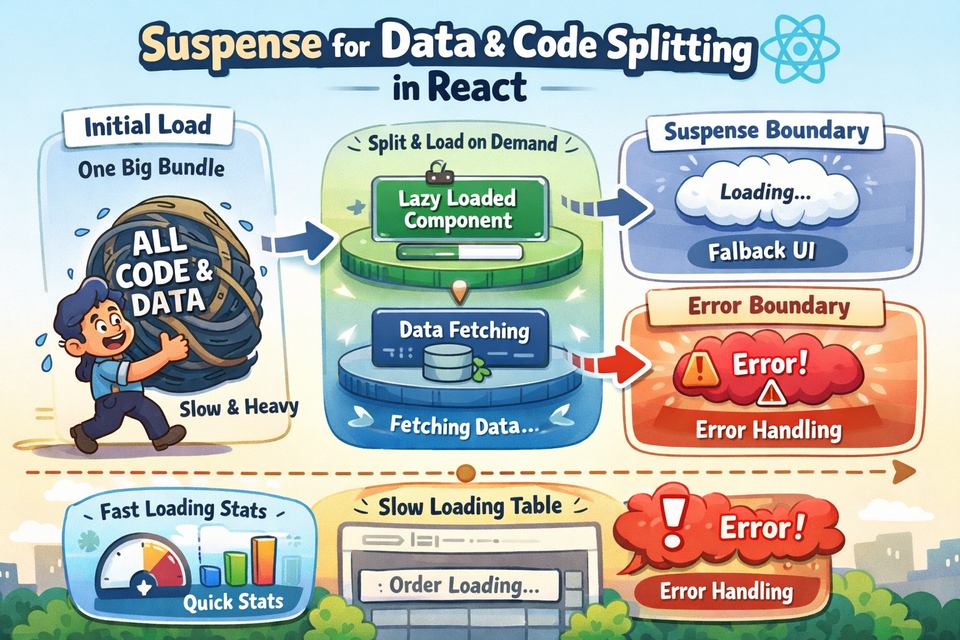
Imagine you walk into a warehouse to pick up an order. The warehouse manager says, "Wait right here — I'll go get your order. While I'm gone, enjoy a coffee." You don't just stare blankly at the wall. You are shown a placeholder experience — and when the manager returns, everything is ready.
That's React Suspense in a nutshell.
In this article, we'll explore how React.Suspense works for two powerful use cases:
- Code splitting — splitting your app bundle so only the needed JavaScript is loaded
- Data fetching — coordinating async data loading with clean UI fallbacks
We'll build all examples around an Order Management System (OMS), so every concept feels grounded and practical.
Before you start: Make sure you're comfortable withuseEffect,useState, and React Router. If not, revisit useEffect with Dependencies and Cleanup and React Router v6 — Nested Routes and Guards first.
What Is React Suspense?
React.Suspense is a component that lets you declaratively specify a fallback UI while some part of your component tree is "waiting" — either for a lazy-loaded component to download or for a data resource to resolve.
<Suspense fallback={<p>Loading...</p>}>
  <SomeSlowComponent />
</Suspense>
Think of the fallback as the "We're preparing your order" screen. Once everything is ready, <SomeSlowComponent /> takes over.
Part 1 — Code Splitting with React.lazy()
Why Does Code Splitting Matter?
In an OMS application, you might have:
- An Order Dashboard loaded daily by warehouse staff
- An Analytics Panel used once a week by managers
- A Settings Page touched rarely by admins
If you bundle all of this into one giant JavaScript file, every user downloads code they may never use. Code splitting solves this by breaking the bundle into chunks and loading them on demand.
React provides React.lazy() for this:
const AnalyticsPanel = React.lazy(() => import('./AnalyticsPanel'));This tells React: "Don't load AnalyticsPanel until someone actually navigates to it."
Project Setup
We'll use json-server to mock an OMS API and React Router for navigation.
Install dependencies:
npx create-react-app oms-suspense
cd oms-suspense
npm install react-router-dom axios
npm install -g json-server
Create mock data file:
📄 db.json (root of project)
{
  "orders": [
    { "id": 1, "orderId": "ORD-1001", "customer": "Alice Johnson", "status": "Shipped", "total": 4500, "items": 3 },
    { "id": 2, "orderId": "ORD-1002", "customer": "Bob Smith",    "status": "Pending", "total": 1200, "items": 1 },
    { "id": 3, "orderId": "ORD-1003", "customer": "Carol White",  "status": "Delivered","total": 8900, "items": 5 },
    { "id": 4, "orderId": "ORD-1004", "customer": "David Lee",    "status": "Cancelled","total": 300,  "items": 1 },
    { "id": 5, "orderId": "ORD-1005", "customer": "Eva Brown",    "status": "Shipped", "total": 6700, "items": 4 }
  ],
  "analytics": {
    "totalRevenue": 21600,
    "totalOrders": 5,
    "pendingOrders": 1,
    "shippedOrders": 2,
    "deliveredOrders": 1,
    "cancelledOrders": 1
  }
}
Start json-server:
json-server --watch db.json --port 3001Building the App Structure
Let's build a simple OMS with three lazy-loaded pages.
📄 src/index.js
import React from 'react';
import ReactDOM from 'react-dom/client';
import App from './App';

const root = ReactDOM.createRoot(document.getElementById('root'));
root.render(<App />);
📄 src/App.js
import React, { Suspense, lazy } from 'react';
import { BrowserRouter, Routes, Route, NavLink } from 'react-router-dom';
import './App.css';

// Lazy-loaded pages — downloaded only when visited
const OrderDashboard = lazy(() => import('./pages/OrderDashboard'));
const AnalyticsPanel  = lazy(() => import('./pages/AnalyticsPanel'));
const SettingsPage    = lazy(() => import('./pages/SettingsPage'));

// A reusable page-level loading fallback
function PageLoader() {
  return (
    <div className="page-loader">
      <div className="spinner" />
      <p>Loading module...</p>
    </div>
  );
}

export default function App() {
  return (
    <BrowserRouter>
      <div className="app-shell">
        <header className="app-header">
          <h1>⚙️ OMS Portal</h1>
          <nav>
            <NavLink to="/"          end>Dashboard</NavLink>
            <NavLink to="/analytics">Analytics</NavLink>
            <NavLink to="/settings"> Settings</NavLink>
          </nav>
        </header>

        {/*
          Suspense boundary wraps ALL routes.
          Any lazy page that hasn't loaded yet triggers <PageLoader />.
        */}
        <Suspense fallback={<PageLoader />}>
          <main className="app-main">
            <Routes>
              <Route path="/"          element={<OrderDashboard />} />
              <Route path="/analytics" element={<AnalyticsPanel />} />
              <Route path="/settings"  element={<SettingsPage />}   />
            </Routes>
          </main>
        </Suspense>
      </div>
    </BrowserRouter>
  );
}
Key idea:<Suspense>is placed outside the<Routes>. When you navigate to/analyticsfor the first time, React hasn't downloaded that chunk yet. It renders<PageLoader />until the JS arrives and the component mounts.
📄 src/pages/OrderDashboard.js
import React, { useEffect, useState } from 'react';
import axios from 'axios';

export default function OrderDashboard() {
  const [orders, setOrders]   = useState([]);
  const [loading, setLoading] = useState(true);

  useEffect(() => {
    axios.get('http://localhost:3001/orders')
      .then(res => setOrders(res.data))
      .finally(() => setLoading(false));
  }, []);

  if (loading) return <p className="info-text">Fetching orders…</p>;

  return (
    <div>
      <h2>Order Dashboard</h2>
      <table className="oms-table">
        <thead>
          <tr>
            <th>Order ID</th><th>Customer</th><th>Status</th><th>Items</th><th>Total (₹)</th>
          </tr>
        </thead>
        <tbody>
          {orders.map(o => (
            <tr key={o.id}>
              <td>{o.orderId}</td>
              <td>{o.customer}</td>
              <td><span className={`badge badge-${o.status.toLowerCase()}`}>{o.status}</span></td>
              <td>{o.items}</td>
              <td>₹{o.total.toLocaleString()}</td>
            </tr>
          ))}
        </tbody>
      </table>
    </div>
  );
}
📄 src/pages/AnalyticsPanel.js
import React, { useEffect, useState } from 'react';
import axios from 'axios';

export default function AnalyticsPanel() {
  const [data, setData]     = useState(null);
  const [loading, setLoading] = useState(true);

  useEffect(() => {
    axios.get('http://localhost:3001/analytics')
      .then(res => setData(res.data))
      .finally(() => setLoading(false));
  }, []);

  if (loading) return <p className="info-text">Loading analytics…</p>;

  return (
    <div>
      <h2>Analytics Overview</h2>
      <div className="analytics-grid">
        <StatCard label="Total Revenue"   value={`₹${data.totalRevenue.toLocaleString()}`} />
        <StatCard label="Total Orders"    value={data.totalOrders}    />
        <StatCard label="Pending"         value={data.pendingOrders}  />
        <StatCard label="Shipped"         value={data.shippedOrders}  />
        <StatCard label="Delivered"       value={data.deliveredOrders}/>
        <StatCard label="Cancelled"       value={data.cancelledOrders}/>
      </div>
    </div>
  );
}

function StatCard({ label, value }) {
  return (
    <div className="stat-card">
      <p className="stat-label">{label}</p>
      <p className="stat-value">{value}</p>
    </div>
  );
}
📄 src/pages/SettingsPage.js
import React from 'react';

export default function SettingsPage() {
  return (
    <div>
      <h2>Settings</h2>
      <p>Configure your OMS preferences here.</p>
      <p className="info-text">
        This page is rarely visited, so it loads lazily — saving bandwidth for warehouse staff
        who only use the Dashboard every day.
      </p>
    </div>
  );
}
📄 src/App.css
* { box-sizing: border-box; margin: 0; padding: 0; }
body { font-family: 'Segoe UI', sans-serif; background: #f4f6f9; color: #1a202c; }

.app-shell { display: flex; flex-direction: column; min-height: 100vh; }

.app-header {
  background: #1e3a5f; color: #fff; padding: 16px 32px;
  display: flex; align-items: center; gap: 32px;
}
.app-header h1 { font-size: 1.3rem; }
.app-header nav { display: flex; gap: 20px; }
.app-header nav a { color: #a0c4ff; text-decoration: none; font-size: 0.95rem; }
.app-header nav a.active { color: #fff; font-weight: 600; border-bottom: 2px solid #fff; }

.app-main { padding: 32px; max-width: 960px; margin: 0 auto; width: 100%; }

.page-loader {
  display: flex; flex-direction: column; align-items: center;
  justify-content: center; height: 200px; gap: 12px; color: #555;
}
.spinner {
  width: 36px; height: 36px; border: 4px solid #ccc;
  border-top-color: #1e3a5f; border-radius: 50%;
  animation: spin 0.8s linear infinite;
}
@keyframes spin { to { transform: rotate(360deg); } }

.oms-table { width: 100%; border-collapse: collapse; margin-top: 16px; }
.oms-table th, .oms-table td { padding: 10px 14px; text-align: left; border-bottom: 1px solid #e2e8f0; }
.oms-table th { background: #edf2f7; font-weight: 600; font-size: 0.85rem; text-transform: uppercase; }

.badge { padding: 3px 10px; border-radius: 12px; font-size: 0.78rem; font-weight: 600; }
.badge-shipped   { background: #bee3f8; color: #2b6cb0; }
.badge-pending   { background: #fefcbf; color: #744210; }
.badge-delivered { background: #c6f6d5; color: #276749; }
.badge-cancelled { background: #fed7d7; color: #9b2335; }

.analytics-grid { display: grid; grid-template-columns: repeat(3, 1fr); gap: 16px; margin-top: 20px; }
.stat-card { background: #fff; border: 1px solid #e2e8f0; border-radius: 10px; padding: 20px; text-align: center; }
.stat-label { font-size: 0.82rem; color: #718096; text-transform: uppercase; margin-bottom: 8px; }
.stat-value { font-size: 1.8rem; font-weight: 700; color: #1e3a5f; }

.info-text { color: #555; font-style: italic; margin-top: 12px; }
Run the app:
# Terminal 1
json-server --watch db.json --port 3001

# Terminal 2
npm start
Open your browser's Network tab. You'll notice:
/static/js/main.chunk.jsloads immediatelysrc_pages_AnalyticsPanel_js.chunk.jsonly loads when you click Analyticssrc_pages_SettingsPage_js.chunk.jsonly loads when you click Settings
That's code splitting in action — your warehouse staff never download the analytics code.
Part 2 — Suspense Boundaries for Data Fetching
So far we've used Suspense for code (lazy components). But Suspense can also coordinate data loading using a pattern called Suspense-compatible resources.
Important Note: The official Suspense-for-data API is fully embraced by libraries like React Query and SWR. We'll use a simple wrapPromise helper to understand the concept, then look at the real-world library approach.
How Suspense "Reads" Async Data
React Suspense works through a throw-based protocol:
- If a component throws a Promise, React renders the nearest
<Suspense fallback>instead - When that Promise resolves, React re-renders the component with the resolved value
- If it throws an Error, the nearest
<ErrorBoundary>catches it
For a deep dive into Error Boundaries, see Error Boundaries and Fallback UIs and our article on Fetch API and Axios Error Handling.
The wrapPromise Helper
📄 src/utils/wrapPromise.js
/**
 * Wraps a Promise so it can be "read" synchronously by Suspense.
 * This is a teaching utility — in production use React Query or SWR.
 */
export function wrapPromise(promise) {
  let status = 'pending';
  let result;

  const suspender = promise.then(
    data  => { status = 'success'; result = data; },
    error => { status = 'error';   result = error; }
  );

  return {
    read() {
      if (status === 'pending')  throw suspender;       // tells Suspense: "still loading"
      if (status === 'error')    throw result;           // tells ErrorBoundary: "something broke"
      return result;                                     // component gets the data
    }
  };
}
Fetching OMS Order Detail with Suspense
📄 src/resources/orderResource.js
import axios from 'axios';
import { wrapPromise } from '../utils/wrapPromise';

export function fetchOrderResource(orderId) {
  const promise = axios
    .get(`http://localhost:3001/orders/${orderId}`)
    .then(res => res.data);
  return wrapPromise(promise);
}
Now let's build an Order Detail view that uses Suspense for data:
📄 src/components/OrderDetail.js
import React from 'react';

/**
 * This component READS from a Suspense resource.
 * If the resource isn't ready, it throws a Promise → Suspense shows fallback.
 * If it's ready, it renders normally.
 */
export default function OrderDetail({ resource }) {
  const order = resource.read(); // ← this is the magic line

  return (
    <div className="order-detail-card">
      <h3>Order: {order.orderId}</h3>
      <table className="oms-table" style={{ marginTop: 12 }}>
        <tbody>
          <tr><td><strong>Customer</strong></td><td>{order.customer}</td></tr>
          <tr><td><strong>Status</strong></td>
            <td><span className={`badge badge-${order.status.toLowerCase()}`}>{order.status}</span></td>
          </tr>
          <tr><td><strong>Items</strong></td><td>{order.items}</td></tr>
          <tr><td><strong>Total</strong></td><td>₹{order.total.toLocaleString()}</td></tr>
        </tbody>
      </table>
    </div>
  );
}
📄 src/components/OrderDetailSkeleton.js
import React from 'react';

export default function OrderDetailSkeleton() {
  return (
    <div className="skeleton-card">
      <div className="skeleton skeleton-title" />
      <div className="skeleton skeleton-row" />
      <div className="skeleton skeleton-row" />
      <div className="skeleton skeleton-row" />
      <div className="skeleton skeleton-row short" />
    </div>
  );
}
Add skeleton styles to App.css:
.order-detail-card {
  background: #fff; border: 1px solid #e2e8f0;
  border-radius: 10px; padding: 24px; margin-top: 20px;
  max-width: 520px;
}

.skeleton-card {
  background: #fff; border: 1px solid #e2e8f0;
  border-radius: 10px; padding: 24px; margin-top: 20px;
  max-width: 520px;
}
.skeleton {
  background: linear-gradient(90deg, #edf2f7 25%, #e2e8f0 50%, #edf2f7 75%);
  background-size: 200% 100%;
  animation: shimmer 1.2s infinite;
  border-radius: 6px; margin-bottom: 12px;
}
.skeleton-title  { height: 24px; width: 60%; }
.skeleton-row    { height: 16px; width: 100%; }
.skeleton-row.short { width: 40%; }
@keyframes shimmer { 0% { background-position: 200% 0; } 100% { background-position: -200% 0; } }
Now update App.js to include this new Suspense-for-data demo alongside the lazy routes. Add this new route and update the imports:
📄 src/pages/OrderDetailPage.js
import React, { Suspense, useState, useTransition } from 'react';
import OrderDetail          from '../components/OrderDetail';
import OrderDetailSkeleton  from '../components/OrderDetailSkeleton';
import { fetchOrderResource } from '../resources/orderResource';

const ORDER_IDS = [1, 2, 3, 4, 5];

export default function OrderDetailPage() {
  const [resource, setResource] = useState(null);
  const [selectedId, setSelectedId] = useState(null);
  const [isPending, startTransition] = useTransition();

  function handleSelect(id) {
    setSelectedId(id);
    startTransition(() => {
      setResource(fetchOrderResource(id));
    });
  }

  return (
    <div>
      <h2>Order Detail — Suspense for Data</h2>
      <p style={{ marginTop: 8, color: '#555' }}>
        Click an Order ID below. Each fetch is wrapped in a Suspense resource.
        While loading, a skeleton shimmer is shown instead of a blank screen.
      </p>

      <div style={{ display: 'flex', gap: 10, marginTop: 20, flexWrap: 'wrap' }}>
        {ORDER_IDS.map(id => (
          <button
            key={id}
            onClick={() => handleSelect(id)}
            className={`order-btn ${selectedId === id ? 'active' : ''}`}
            disabled={isPending}
          >
            {isPending && selectedId === id ? 'Loading…' : `ORD-100${id}`}
          </button>
        ))}
      </div>

      {resource && (
        <Suspense fallback={<OrderDetailSkeleton />}>
          <OrderDetail resource={resource} />
        </Suspense>
      )}
    </div>
  );
}
Add button styles to App.css:
.order-btn {
  padding: 8px 18px; border: 2px solid #1e3a5f;
  border-radius: 6px; background: #fff; color: #1e3a5f;
  cursor: pointer; font-weight: 600; transition: all 0.15s;
}
.order-btn:hover, .order-btn.active {
  background: #1e3a5f; color: #fff;
}
.order-btn:disabled { opacity: 0.6; cursor: not-allowed; }
Update App.js to add the new route:
// Add this import near the top of App.js
const OrderDetailPage = lazy(() => import('./pages/OrderDetailPage'));

// Add this route inside <Routes> in App.js
<Route path="/order-detail" element={<OrderDetailPage />} />

// Add this NavLink in the header nav
<NavLink to="/order-detail">Order Detail</NavLink>
Part 3 — Multiple Suspense Boundaries
One of Suspense's superpowers is that you can have multiple independent boundaries. Each boundary manages its own loading state.
In an OMS dashboard, imagine:
- The order table loads slowly (many rows, complex query)
- The summary stats load quickly (a single aggregation)
Without Suspense, a single isLoading flag blocks everything. With Suspense:
<div className="dashboard-split">
  <Suspense fallback={<Skeleton type="stats" />}>
    <SummaryStats resource={statsResource} />
  </Suspense>

  <Suspense fallback={<Skeleton type="table" />}>
    <OrderTable resource={ordersResource} />
  </Suspense>
</div>
Stats appear the moment they're ready — without waiting for the full table. This is a huge UX win for warehouse managers staring at a screen first thing in the morning.
This composability is what makes Suspense fundamentally different from theisLoadingpattern you'd use withuseEffect. For a refresher on whyuseEffectworks the way it does, see useEffect with Dependencies and Cleanup.
Part 4 — Real-World: Suspense with React Query
The wrapPromise approach above is great for understanding — but in production, use React Query or SWR. Both libraries have built-in Suspense support.
We covered React Query and SWR in depth in SWR & React Query for Fast Cached Data Fetching.
With React Query, enabling Suspense is just one flag:
// In your query hook
const { data: orders } = useQuery({
  queryKey: ['orders'],
  queryFn: () => axios.get('http://localhost:3001/orders').then(r => r.data),
  suspense: true, // ← that's it
});
Then wrap your component:
<Suspense fallback={<OrderDetailSkeleton />}>
  <OrderDashboard />
</Suspense>
React Query handles the throw-and-resume protocol for you. The orders variable in your component is always defined — no if (loading) return ... needed. Clean, readable, and production-safe.
Common Mistakes to Avoid
1. Placing Suspense too high in the tree
If you wrap your entire app in a single Suspense boundary, one slow component will block everything from rendering. Prefer multiple, granular boundaries close to the components they protect.
2. Forgetting ErrorBoundaries alongside Suspense
Suspense handles pending states. Errors still need an <ErrorBoundary>. Always pair them:
<ErrorBoundary fallback={<p>Failed to load orders.</p>}>
  <Suspense fallback={<OrderDetailSkeleton />}>
    <OrderDetail resource={resource} />
  </Suspense>
</ErrorBoundary>
See our article on Error Boundaries and Fallback UIs for the full pattern.
What's Next?
In the next article, we'll go deeper into how React makes async UIs feel instant by exploring React 18 Concurrent Features — Transitions and Streaming. We'll look at useTransition, startTransition, and server-side streaming with Suspense — all through the lens of a real-time OMS shipment dashboard.
Stay tuned — it's going to be a good one. 🚀
Member discussion